
Background
Strava, for those who don’t know, is a platform where you can track your rides, runs, swims (any exercise, really), and share these activities with friends. Other Strava users can then look at your activities and give you “kudos”… basically the Facebook equivalent for athletes. A main feature of Strava is its GPS tracking, meaning that after your activity, you can see exactly where you went on a nicely-rendered map. Knowing this, some athletes go as far as to run/ride/swim/ski/whatever in a specific pattern in the real world, creating a beautiful design when looking at the GPS route afterward. This is Strava art.
I’ve been using Strava since the start of high school, but I first heard about Strava art a few years ago when one of my UCLA cycling teammates, Max, biked a turkey-shaped route in San Francisco on Thanksgiving. Besides being a 60-mile-long turkey, the amazing thing was that the route did, in fact, look just like a turkey:
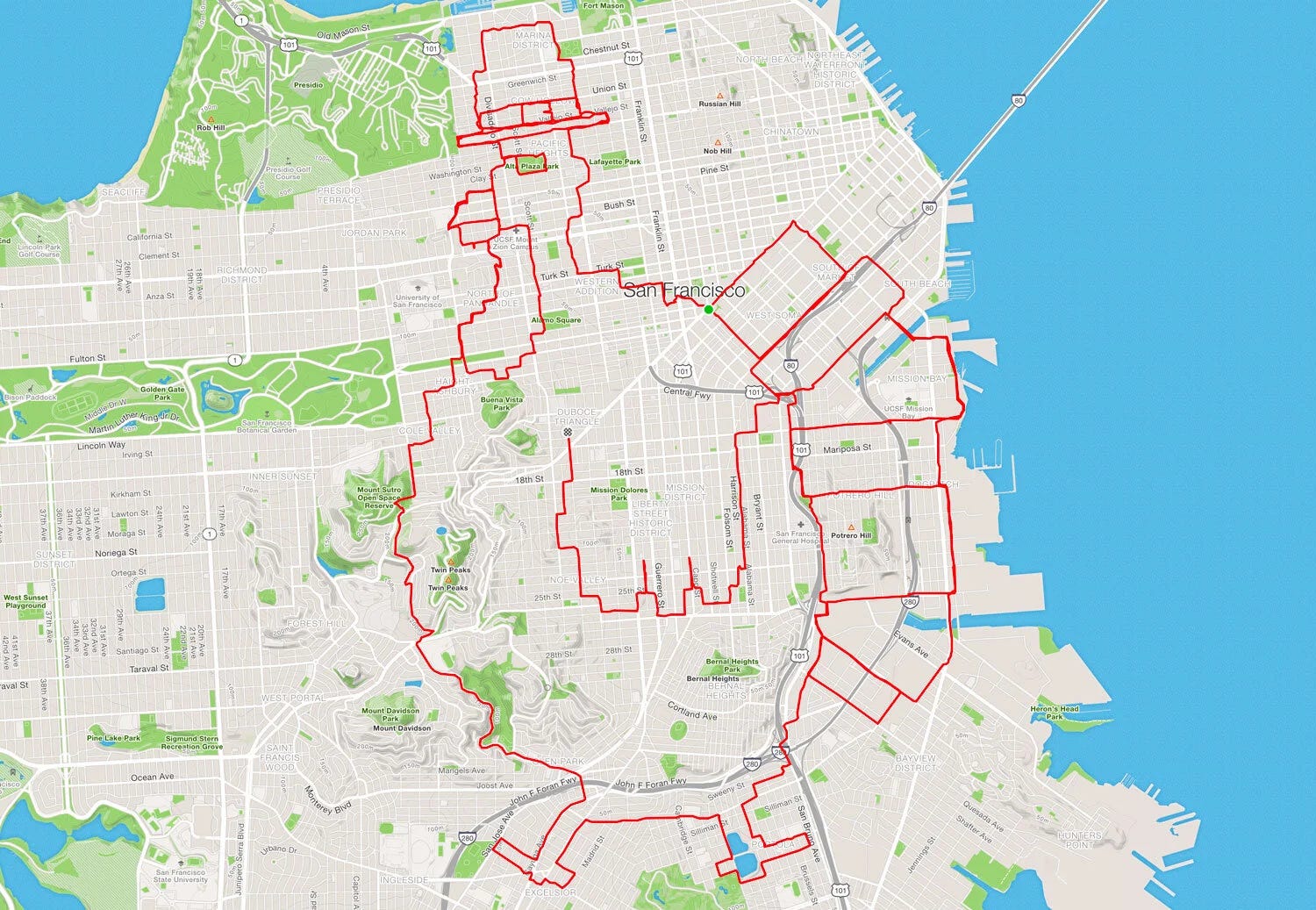
For some reason, a few days ago when I was pondering the rapidly approaching holiday season, I remembered this festive bike ride, and decided to go ride some Strava art myself. So, I found a neighborhood a few miles away from mine that had a somewhat-regular street grid, drew out a route that would spell “HoHoHo”, got on my bike, and set off.
It failed miserably:
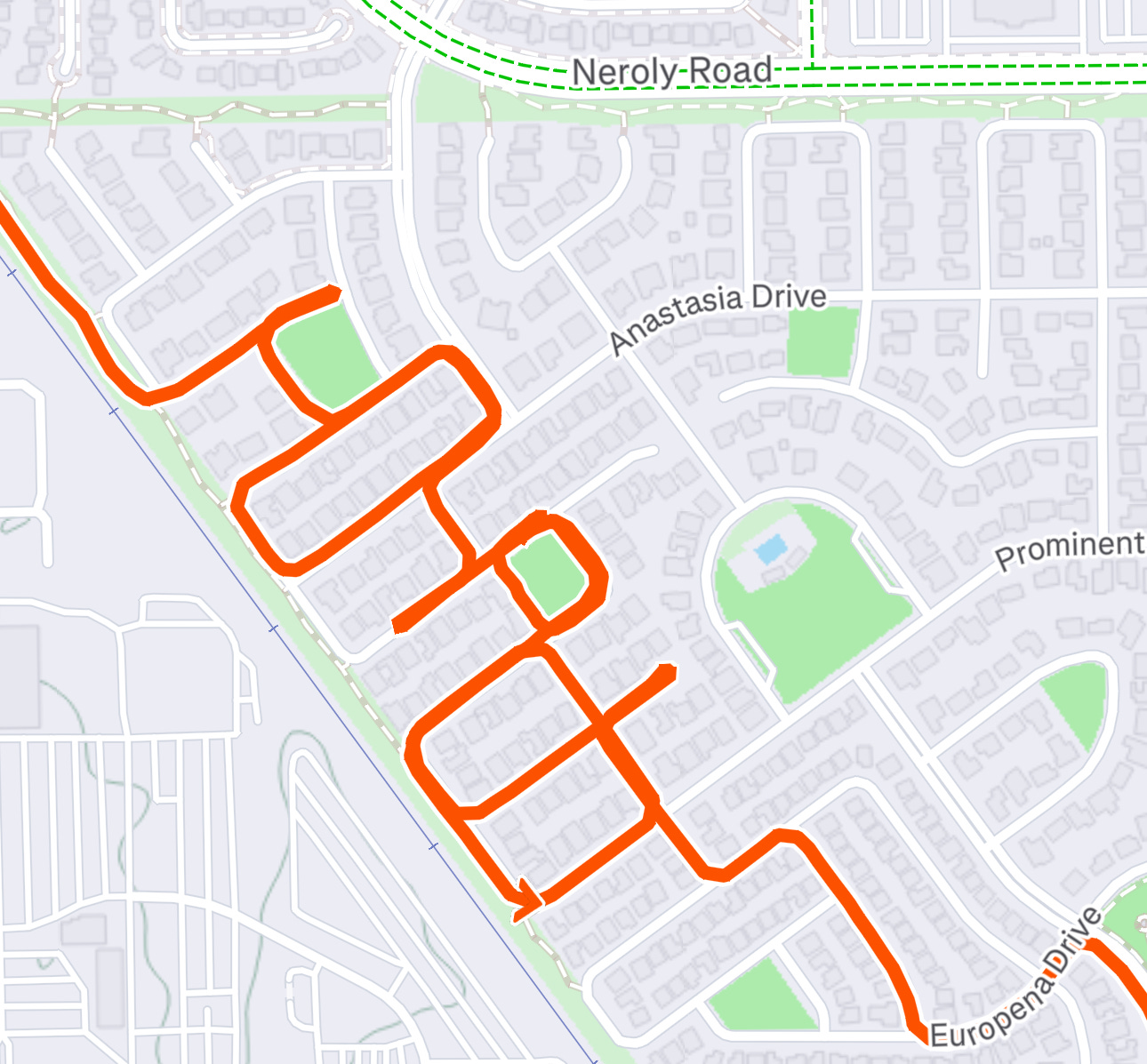
Besides the letters being a lot more smushed together on the final map than I’d anticipated, I mistakenly biked an extra road, spelling “HoHodo”. Bruh moment.
Once I got home, I called my friend Sanketh to tell him about the ride, and proceeded to spend a few minutes looking at some Strava art examples online. It turns out that there are a ton of fantastic routes people have created (each one MUCH better than mine), including some “HoHoHo” designs that actually spelled… “HoHoHo”. A few examples:


I figured there had to be some design tools out there that helped create Strava art, looked into a few different options, but eventually decided to have a go at making my own website to help me out. I’d been hearing all about vibe coding for the past few months, and figured this would be a great project to try out vibe coding with.
Vibe coding, for those that don’t know, is the process of creating some programmable product with an AI tool that’s sufficiently advanced so that you don’t actually need to… know how to code. Rather, you just use normal English to direct the AI programmer to do exactly what you want, and then it goes and does it. Plus, I’d recently listened to my friend Cole’s podcast interview of a professional vibe coder (who calls vibe coding “hyper-engineering”), so naturally I was itching to do some kind of project at home. So vibe coding a Strava art website, it was.
Game time
My go-to tool for this kind of development is Cursor, which I’d previously used to reformat my resume using LaTeX. I’d heard about Cursor from my sister… who just so happens to work there. I tried it out for a few small projects, loved it, and used it for this one, too.
For the layperson, Cursor is basically an all-in-one AI-powered coding assistant that can do pretty much any coding task you ask of it. Any task, at least, that I can think of asking it to do. It has a friendly interface, fantastic tools, and the cheeky line “Planning next moves” when the coding agent is deciding what to do.
This was the initial query to the agent:
Create a React-based web application for creating GPS art routes for Strava. It should allow users to click on a map to create routes, upload images to trace over, snap routes to roads, and export as GPX files. Upload the files to GitHub and host the website under GitHub Pages.
(GitHub is a free code storage and running service, and GitHub Pages is GitHub’s free website hosting service. Lit. If you don’t know what any of this means, ask Uncle Gemini)
After making the query, the agent went ahead and did all that I asked insanely quickly and pretty much perfectly. I gave a number of follow-up commands (re-format this, make the footnotes that, add this feature, remove this unnecessary one), and after about 2ish hours of decent focus, I was able to create a nicely polished website. Check it out!
Its features include:
You can click on the map to drop points, which are then linked together into a route
You can upload a PNG file, which is then transparently overlayed onto the map for you to trace
You can draw directly onto the map, which is then converted into the closest approximated route based on the available roads
You can enable “Snap to Roads”, which makes sure the different points you drop are actually connected via real roads and don’t go through building/train tracks/water/obstacles
Plus, it looks great with nice UI :)
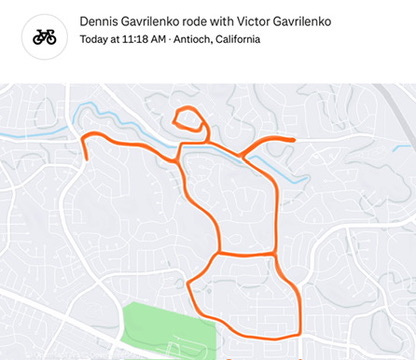
To top it all off, I used the website to create a much better route than my initial “HoHoHo” attempt, and biked an 8-mile snowman with my dad and brother on Christmas. Take that, Santa! 🧑🎄
Ultimately, it seems that powerful AI tools have replaced nearly all the prerequisites to making most basic programmable things, making your imagination the only limit to what you can build. Lfg
Some lessons learned/notes:
The better you prompt and the more details you include, the better the final result will be. This so-called “prompt engineering” actually makes a huge difference, so knowing what you want and what can be made is a huge +. The takeaway there is to use lots of great products to see what greatness looks like… and then copy the shit out of that for your own projects
Open source mapping software is a gift to the world. The Open Street Maps map that I used, and the free road-snapping algorithm, meant that I didn’t need to invent anything, but rather piece together existing services for the website. Plus, I used the free app Organic Maps to upload the .GPX file to my phone and then followed it on the bike ride
Opus 4.5 is by far the best model to use on Cursor. Yes, it burns through credits like they’re made of paper, but I’d rather pay more for something that works than less for something that doesn’t. So, Opus does all the major work, and Cursor’s in-house Composer 1 (which is way cheaper and faster) does all the tune-ups (editing footnotes, reformatting buttons, adding text, etc.)
Cursor’s Auto mode sucks. I started with Auto, it wasn’t working, and I was getting ready to give up. I then switched to Opus at my sister’s recommendation, and it magically started working (see above)
For a $20/month Cursor subscription and a free GitHub account, you can pretty much create any intermediate-level-or-above programmable thing you can think of. Strava art website? Check. Personal website? Check. LaTeX resume formatter? Check. Meditation app? Yessir. My next project is a much more ambitious long-distance backpacking app, which I’ll write more about when things get up and running
There are three great existing websites for creating Strava art, all of which are much better than mine, two of which are free. Check out my website, but check out the others, too! RouteSketcher and RouteDoodle were the free ones
Resources:
Cursor (students get one free year of Pro!)
Dennis’s Picks:
I quite enjoy “xx things I learned by xx years old” lists, and this one has been one of my favorites. I found it from one of Jack Raines’s articles, who himself is a fantastic writer and the inspiration for this blog
I recently read the book “Private Equity” and loved it. It’s a personal memoir of the former sole assistant to a top hedge fund manager, and chronicles her insane life and work commitments on the job. Fascinating read, and makes me want to go into finance even less than I already did lol. I’ve been on quite the memoir kick for the last few months, and this one was one of my favorites
The website GPTZero. You paste in text, and it tells you which parts, if any, have been written by AI. I’ve found it to be very accurate, making it quite eye-opening when you realize something you thought someone actually wrote was, in fact, written by Uncle Gemini
Loved this a lot man. Fascinating how many different toolkits are being used across “vibe coders” and it makes me want to experiment more, especially with your note on Opus.
I’ve been working on a personal brand site and the stack I’m using is unbelievably intuitive (Replit with GPT as my co-prompt engineer) but I haven’t gotten under the hood and my asks have been simple.
Enjoyed your picks at the end!! Hope you are well :)